
Preview your website before DNS points to it
Enter a domain and the server IP. Get a shareable HTTPS link to the site on that server — no hosts file, no proxy setup, no waiting for propagation.
Trusted by hosting teams and agencies · Around since 2017 · 1.1M links created



























How it works
From new server to client sign-off in three steps.
-
1
Enter the domain and server IP
Use the site's real domain and the IP of the server it runs on — usually the new host after a migration, or a staging box.
-
2
Get your preview link
SkipDNS loads the site from that server and serves it over HTTPS on its own URL, with a QR code for phones and tablets.
-
3
Share it, then switch DNS
Send the link to clients and teammates. When everyone has signed off, update DNS — nothing else changes.
Check the new server before anyone else sees it
The hosts-file workflow, without the hosts file.
No local setup
No hosts file edits, browser extensions or proxies. Paste a domain and an IP, and you're done.
Works on every device
It's a normal URL, so it opens on phones, tablets and any browser — handy for mobile QA.
HTTPS out of the box
Previews are always served over HTTPS, even when the origin has a self-signed or mismatched certificate.
Easy to share
Clients don't need instructions. They click the link and see the site on the new server.
Build on the final server
Develop on the production host with the definitive URL from day one. Go live with a DNS update — no environment swap.
Wildcard and multisite
Route the apex and every subdomain through the same preview for WordPress multisite and multitenant apps.
More than a preview link
Sign up to unlock the tools teams use every day.
Password-protected links
Add an optional password so only the people you choose can open a preview.
Your own domain
On paid plans, serve previews from a domain you own, connected through a guided Cloudflare setup.
Spaces
Save a server's IP and ports once, then create links for every site on it in seconds.
QR codes
Every preview gets a QR code, so testing on a phone takes one scan.
REST API
Create and manage links from your own tools and pipelines. API docs
cPanel plugin and CLI
Let hosting customers create previews from cPanel, or script them on the server. Plugin details
Built for hosting companies and agencies
Faster post-migration checks, fewer support tickets.
Catch problems before go-live
Verify the migrated site on the new server and fix issues before DNS changes and real visitors arrive.
Customers sign off themselves
Customers review their own site before the switch, so cutover day brings fewer surprises and fewer tickets.
Stand out from other hosts
Offering SkipDNS in your control panel gives your customers a smoother migration than the usual hosts-file instructions.
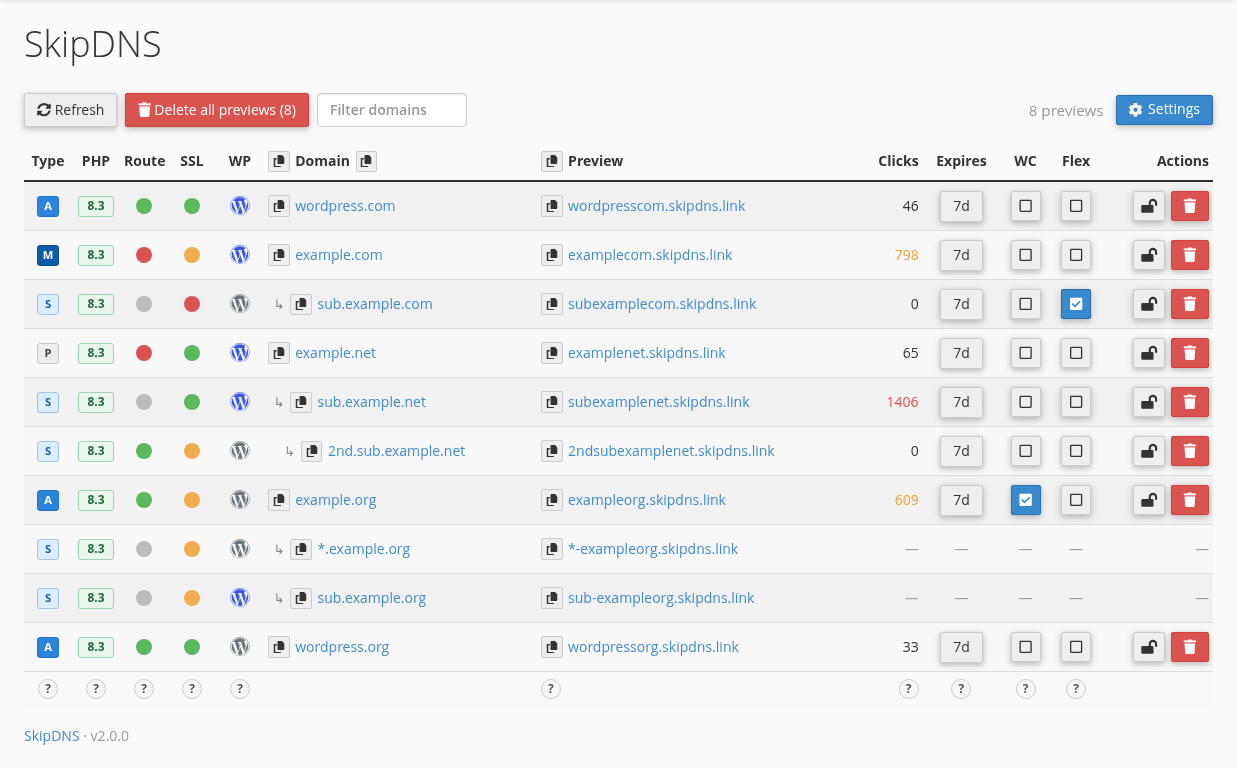
Customers create preview links right from cPanel. Free-slot previews last 1 week by default, down to 1 day, 1 hour or 1 minute on busier destinations, and expired previews can be renewed for free.
Wildcard multisite, Flexible SSL, per-user API tokens, paid-slot links and optional one-time extensions are built in.
Clients can open previews from cPanel in a few clicks. No hosts file edits, no DNS changes, and no tickets to your team for temporary URLs.
Migrating sites yourself? The bundled CLI creates matching links for the old and new servers.
Start free. Upgrade when links need to stay.
Free
$0
- Unlimited free-slot preview links
- Each lasts 1 week by default, renewable for free
- HTTPS, QR codes, API access and optional passwords
Paid plans
from $9.9/month
- Paid-slot links that stay active until you delete them
- Custom domains on higher tiers
- Free trial on monthly and yearly plans
Need one free-slot link a little longer? One-time extensions start at $1. Compare all plans
What people who migrate sites for a living say

“I just discovered SkipDNS and wanted to say, thank you! This tool is amazing and super helpful as I do a lot of WordPress migrations.”

“Hosts file is still the best method, but hard to share with others since it's not super easy to explain how to do. SkipDNS creates actual URLs you can send other folks so it's also good when working on a site on a server that is not live yet.”

“As a hosting provider, we see thousands of monthly migrations into our platform. SkipDNS has made the process far simpler, letting clients verify their sites before go-live. Thank you for this incredible solution to a very niggly problem!”

“Are you kidding me! I use SkipDNS during every migration now. It's such a seamless tool that makes confirming migrations a breeze. That guy deserves 6 out of 5 stars really.”
Your next migration, without the hosts file
Create a free account to manage links, add passwords and use the API.
Or try a preview link now — no account needed.